
UREVO Walking Pad Review: CyberPad for Office Specs, Pros and Cons
A research-based UREVO walking pad review of one model, the CyberPad for Office: speed, incline, desk fit, weight limits, upkeep, and who should skip it.

UREVO sells several walking pads, and this UREVO walking pad review covers one model: the UREVO CyberPad for Office (model URTM051), a flat under-desk pad with powered incline. Our verdict: it is a strong candidate for a home office with a standing desk, where you want to walk at up to 4 mph and add incline on breaks. It is a weaker fit if you want to jog, need something to hold on to, weigh close to its lowest published weight limit, or can only set it on carpet.
This is a research-based review, not a product trial. We read the Amazon listing for this model, UREVO’s product page, and UREVO’s US user guide for the URTM051, and searched the CPSC recall list. UREVO’s own documents and the listing disagree on a few key numbers, and we show all of them so you can decide which to plan around. Other UREVO models are mentioned only briefly, using their Amazon listings.
This review is general product information, not medical or fitness advice. If you have pain, an injury, or a health condition, talk to a qualified healthcare professional before starting a new exercise routine.
We earn a commission from qualifying purchases made through links on this page. Commissions never affect our rankings or StrengthRoomLab Scores.
This page is general product information, not repair or electrical safety advice. Follow the safety instructions in your product’s manual, supervise children, and contact the manufacturer or an authorized service center if a product sparks, overheats, or has a damaged cord.

UREVO CyberPad for Office




As an Amazon Associate we earn from qualifying purchases.
UREVO CyberPad for Office at a Glance
Each cell names its source. “UREVO” means UREVO’s product page; “US guide” means UREVO’s US user guide for the URTM051; “listing” means the Amazon listing.
| Spec | UREVO CyberPad for Office (URTM051) |
|---|---|
| Speed | 0.6 to 4.0 mph (UREVO); the listing gives 0.5 to 4 mph |
| Incline | 0 to 14% auto incline, 14 levels (UREVO); 14% (listing) |
| Motor | 2.5 HP, dual brushless (UREVO and listing) |
| Walking area | 39.4 x 16.5 in (UREVO) |
| Overall size | 42.9 x 22.8 x 6.3 in, L x W x H (UREVO); the listing gives the same three figures, rounded and in a different order |
| Product weight | 63.1 lb (UREVO); 63 lb (listing) |
| Maximum user weight | 300 lb (US guide); 400 lb (UREVO); 242 lb (listing) |
| Handrail | Not included; sold separately as an accessory (UREVO) |
| In the box | Remote, hex tool, lubricating oil, power cord, and user manual (UREVO) |
| Controls | Remote control and UREVO app (UREVO, US guide) |
| Warranty | 24 months after activation for eligible purchases (US guide); 1 year plus 180 days (UREVO); 1 year (listing) |
Two listing figures do not fit the machine. The listing gives a deck of 46.8 x 19.3 in and a folded size of 46.8 x 19.3 x 4.8 in, but UREVO lists the whole machine at 42.9 in long, so a 46.8 in deck cannot be right. UREVO does not describe a fold for this model, so we use UREVO’s walking area and overall size and do not count on folding it.
What We Like
- Low profile for a desk. UREVO lists a 6.3 in height and says the pad is designed for under-desk walking.
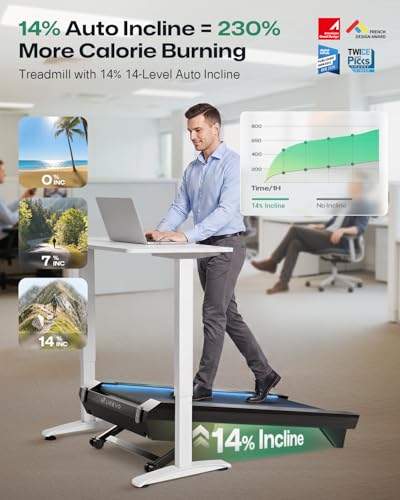
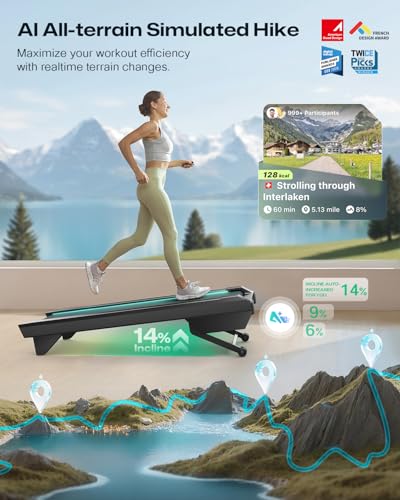
- Powered incline. UREVO lists 0 to 14% auto incline in 14 levels, and the US guide shows incline up and down buttons on the remote.
- Everything to start in the box. UREVO’s page lists a remote, a hex tool, a bottle of lubricating oil, a power cord, and a user manual.
- Plain answers from the maker. UREVO’s product page answers practical questions directly, from desk fit to carpet to belt slipping, and its noise claim comes with conditions attached.
- App syncing. UREVO says the app syncs with Apple Health and Google Fit and that the pad uses the Bluetooth FTMS protocol.
What Could Be Better
- Three different weight limits. The US guide says 300 lb, UREVO’s product page says 400 lb, and the listing says 242 lb.
- Three different warranty statements. The US guide, the product page, and the listing each describe the warranty differently.
- Walking speeds only. The top speed is 4 mph per UREVO, and there is no handrail in the box.
- Not for carpet. UREVO’s product page says not to use it on carpet and recommends a running mat.
- Listing errors. The listing’s deck and folded-size figures are larger than the machine itself.
Weight Limit: Three Different Numbers
This is the most important number to get right, and it is the one the sources disagree on most. UREVO’s US user guide for the URTM051, the document written for the US model, says the maximum weight capacity is 300 lb and not to exceed it. UREVO’s product page lists a maximum load of 400 lb. The Amazon listing gives a maximum weight recommendation of 242 lb.
Our advice is to plan around the lowest figure that applies to you. If you weigh well under 242 lb, the conflict does not change anything. If you weigh between 242 and 300 lb, the US guide covers you, but the listing does not, so ask UREVO to confirm in writing before you buy. If you weigh more than 300 lb, the only source that covers you is the product page, and the guide that ships with the US model says otherwise, so we would look at a different machine.
Under the Desk: Height, Speed, and Incline
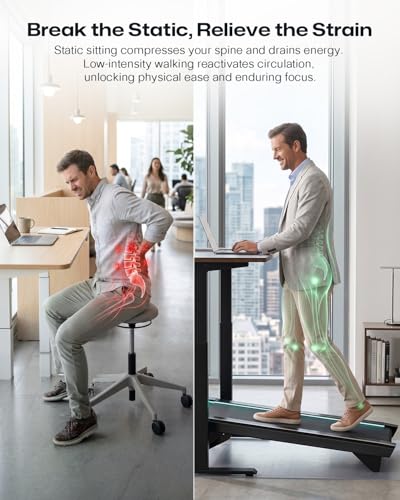
The CyberPad for Office is built for walking while you work. UREVO lists a 6.3 in profile and an overall size of 42.9 x 22.8 in, and its product page tells buyers to check both the floor area and the clearance under the desk before purchasing. It recommends an adjustable standing desk so you can set the height to suit you. If you plan to use incline at the desk, also check that the raised front of the pad stays clear of the desk frame, a precaution of our own.
The speed range is 0.6 to 4.0 mph per UREVO. UREVO’s own guidance is that slower speeds suit typing, calls, and reading, and that faster speeds are better for breaks or dedicated walking sessions. The same goes for incline: UREVO says a flat or low setting is more practical for desk work, and higher levels suit short breaks or off-desk walks.
UREVO’s product page also says its walking pads reach up to 4 mph, which it describes as suitable for light jogging. With a 39.4 x 16.5 in walking area and no handrail in the box, we treat this as a walking machine. If you want to run, a full treadmill with a longer deck and a handrail is the better tool.
Space, Floors, and Noise
Plan for more room than the pad itself. UREVO’s US guide asks for about 4 ft (1.2 m) side to side and about 6.5 ft (2 m) front to back, and it says using the machine on uneven ground is prohibited. The listing’s spec table mentions a folded size, but UREVO does not describe a fold, so plan to store it flat at its full 42.9 x 22.8 in footprint, against a wall or under a desk.
On carpet, UREVO’s product page is direct for this model: it says not to use the treadmill on carpet, not to block the heat dissipation holes on the motor’s bottom cover, and recommends using it on a running mat. The US guide adds that the air openings must never be blocked and should be kept free of lint and hair. If your only spot is carpeted, read up on using a walking pad on carpet before you buy.
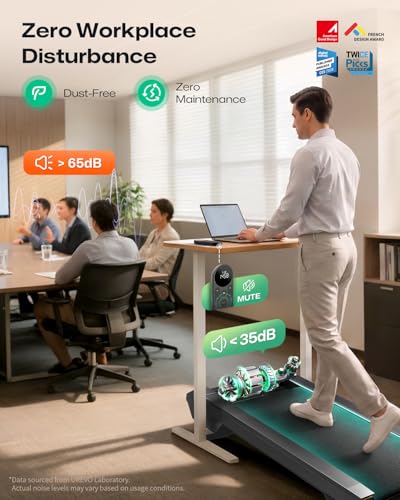
On noise, the listing claims operation under 35 dB. UREVO’s product page puts it more carefully: it says the pad is designed to operate at about 35 dB under conditions it specifies, and that actual sound varies with speed, footwear, floor type, and the room. In an upstairs apartment, footfall through the floor can matter as much as motor noise, so a firm mat and moderate speeds during quiet hours are sensible, as general advice.
Controls, App, and Upkeep
The remote handles day-to-day control. According to the US guide, a short press starts or pauses the belt, and a long press shows “End” and slows the belt until it stops completely; other buttons raise and lower the speed and incline, mute the buzzer, and turn the lights on or off. The guide says the remote needs batteries and that the treadmill must be powered on for it to work.
UREVO’s product page says the UREVO app tracks steps, activity time, and distance, offers Quick Start and Custom Walk modes, and syncs with Apple Health and Google Fit. The US user guide is short and refers owners to a detailed manual inside the UREVO app, so plan to install the app even if you mostly use the remote.
For upkeep, UREVO includes a hex tool and lubricating oil. Its product page says a slipping belt is too loose and should be tightened on both sides with the hex wrench, a quarter turn at a time, until it no longer slips. The US guide says to unplug the machine after use and before cleaning, and to unplug it before putting on or taking off parts.
Electrical and Household Safety
UREVO’s US user guide says the treadmill must be grounded and plugged into an outlet that is properly installed and grounded, and not to modify the plug; if it does not fit the outlet, it says to have a proper outlet installed by a qualified electrician. It also says to keep children under the age of 13 away from the treadmill, not to use it outdoors, and never to operate it with a damaged cord or plug. The guide also says to unplug it when it is not in use; in a home with kids or pets, keeping the remote out of reach as well is a sensible step of our own.
When we searched the CPSC’s downloadable recall list for this review, it showed no recall under the UREVO name. Recalls can be added at any time, so check again before you buy.
How It Compares
The CyberPad for Office is a flat, walking-only pad with no handrail. Two other UREVO models show what you trade by choosing it, based on their Amazon listings:
- UREVO SpaceWalk 5L (model URTM054). Its Amazon listing gives a 300 lb maximum weight recommendation, a 4 mph top speed, and a product weight of 50.7 lb, lighter than the CyberPad’s listed 63 lb. Its incline figures are inconsistent within the listing, which gives 10% in the title and a higher figure in the spec table.
- UREVO FoldiMix 5L (model URTM047). Its Amazon listing describes speeds from 0.6 to 7.6 mph, a height-adjustable laptop desk and handlebar, and a 300 lb maximum weight recommendation. It suits someone who wants to jog and does not own a standing desk, at the cost of a larger machine.
If you are still deciding which kind of machine you want, the best walking pad for you depends on whether you walk under a desk, want a handlebar, or need to fold it away every day.
Who Should Look Elsewhere
- Joggers and runners. The top speed is 4 mph per UREVO, and there is no handrail in the box.
- Anyone near the weight limits. The sources give 242, 300, and 400 lb; if you are above 242 lb, confirm with UREVO first.
- People who need to hold on. A handrail is an optional extra per UREVO. If balance is a concern, talk to a healthcare professional and look at a model with a built-in handlebar.
- Carpet-only rooms. UREVO says not to use this model on carpet.
- Porches, patios, and other outdoor spaces. The US guide says not to use it outdoors.
How We Reviewed It
We do not conduct our own product trials; our picks draw on published specifications, independent reviews, and Amazon owner ratings, which also set each product’s StrengthRoomLab Score. For this review we read the Amazon listing for the URTM051 in full and checked it against UREVO’s product page and UREVO’s US user guide for the same model, and we searched the CPSC recall list. Where the sources disagree, we show every figure and say which one we plan around. Commissions never affect which products we cover or how we score them. The full method is on our How We Review page.
Final Verdict
The UREVO CyberPad for Office is a well-documented under-desk walking pad: a 6.3 in profile, 0.6 to 4.0 mph, auto incline up to 14%, a remote and app, and a product page that answers practical questions plainly. Its weak points are conflicting weight limits and warranty terms across UREVO’s documents and the listing, a listing with impossible deck figures, no handrail, and a no-carpet rule. If you walk at a standing desk on a hard floor and weigh well under the lowest published limit, it belongs on your shortlist. Browse our walking pads category for more options we have researched.
Frequently Asked Questions
Are UREVO walking pads good?
We review models one at a time rather than rating the brand as a whole. For the CyberPad for Office, UREVO publishes a detailed product page, a US user guide, and plain answers to setup questions. The weak spot is consistency: the US guide, the product page, and the listing give different weight limits and warranty terms. Whichever UREVO model you consider, plan around its lowest published weight limit and confirm the warranty with UREVO.
How do you oil a UREVO walking pad?
UREVO includes a bottle of lubricating oil and a hex tool with the CyberPad for Office, and its product page points owners to UREVO’s lubrication video. Unplug the machine first, as the US guide requires before putting on or taking off parts, and follow your model’s manual for the steps of lubricating a walking pad belt.
How much weight can the UREVO CyberPad for Office hold?
It depends on which source you read. UREVO’s US user guide says 300 lb and not to exceed it, UREVO’s product page says 400 lb, and the Amazon listing says 242 lb. We plan around the lowest figure that applies to you and suggest asking UREVO to confirm in writing if you are above 242 lb.
Will the UREVO CyberPad for Office fit under a standing desk?
UREVO designed it for that and lists a 6.3 in height with an overall footprint of 42.9 x 22.8 in. Its product page tells buyers to check both the floor area and the clearance under the desk, and it recommends an adjustable standing desk so you can set a comfortable height.
Does the UREVO CyberPad for Office come with a handrail?
No. UREVO’s product page says a handrail is not included in the standard package and is sold separately as an optional accessory. If you need something to hold while you walk, factor that in, or look at a model with a built-in handlebar.
About the author
Sean Freeman has maintained a home fitness routine for five years, combining daily walking, recreational running, and resistance band and mobility exercises. Over the past two years, Sean has researched and written about compact fitness equipment, focusing on storage, ease of use, and suitability for smaller living spaces. Sean covers walking pads, gym flooring, and resistance bands, helping readers build practical spaces for everyday exercise.